Pull Loads
Overview
To print the load sheets for the truck drivers for all items required to be delivered on the chosen date, go to the Customer Deliveries Section of the Inventory menu. Click on Pull Loads.
The "Pull Load for" form will appear.
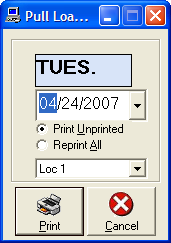
Options
Choose the date for the pull loads and click Print. This can be reprinted as often as necessary by selecting
the Reprint All option.
Note: For tracking purposes, there is a place for the driver to initial that he/she pulled each piece for delivery.
Setting up Customer DELIVERIES
Before you can use this section, the customer deliveries must be setup, either at the Point of Sale or after the sale is written, in Check Order Status.
Use this when Lay-A-Ways, Special Orders, Special-Specials, or Tag Incoming Stock orders have been received and need to be set up for delivery.